A Fire Kids Tablet Undercuts the iPad on Price; the Subscription and the Setup Decide the Rest
A Fire Kids tablet costs less than an iPad at list price, but its bundled Kids+ subscription renews as a paid plan. What each one actually costs and controls.

Part of the guide: Tech and Audio Buying Mistakes: What Fails and How to Check Before You Buy
A Fire HD Kids tablet costs less at checkout than an Apple iPad, going by the two companies’ list prices. It comes bundled with a case, a two-year worry-free guarantee, and a subscription to Amazon Kids+ that is included for a limited time before it starts billing on its own.
An iPad costs more before anything is added, and its parental controls depend on a parent setting up Family Sharing and a Child Account first. Which tablet actually costs less, and controls more, depends on how long the family keeps it and how carefully those controls get set up.
Fear Index · Think twice
Cheap tablet, recurring subscription
A Fire Kids tablet costs less than an iPad at list price, but the Amazon Kids+ subscription bundled with it renews automatically at Amazon’s applicable rate once its included period ends, and COPPA reaches any app that knows a user is under 13.
What is in the box, and what renews
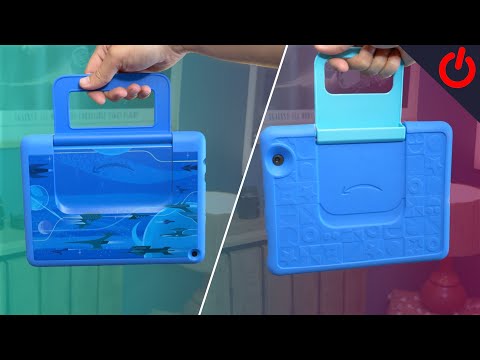
Fire Kids tablets are sold with a kid-proof case and a bundled Amazon Kids+ subscription; Amazon says each of its Kids devices comes with either a 6-month or 12-month subscription. Amazon Kids+ curates age-sorted books, games, videos and apps behind a kids-focused interface, aimed at keeping a child inside vetted content rather than the open app store or browser.
Once that included period ends, the subscription renews automatically at Amazon’s applicable rate unless it is canceled first. An iPad comes with no kids’ content service like Kids+ and no case; whatever a child needs there is a separate purchase.
If Kids+ lapses, Amazon’s free Amazon Kids child profiles and Parent Dashboard remain, per Amazon’s setup guide, but the Kids+ library of books, games and videos does not; that is the trade a family makes when it cancels. The current price and included term both change from time to time, so the specific listing is worth checking before buying rather than assuming last year’s terms.
Amazon Parent Dashboard versus Apple Screen Time

Amazon’s own parental-control feature, the Parent Dashboard, lets a guardian create a child profile, set screen-time limits, curate age-appropriate content and review activity from one place.
Apple’s equivalent, Screen Time, depends on Family Sharing: Apple’s instructions call for setting up Family Sharing, creating a Child Account for the child and adding it to the family group, then managing Screen Time from a parent’s device. Once that is done, Apple says Ask to Buy and Ask to Browse are on by default for children under 13, Limit Adult Websites is on by default for children under 18, and many Content & Privacy Restrictions are applied automatically based on the child’s age, with parents able to adjust them at any time.
Both tablets tie their controls to a child profile or Child Account. On an iPad, that account has to be set up inside Family Sharing before Apple’s age-based defaults apply.
What COPPA does and does not cover
The Children’s Online Privacy Protection Act gives parents control over what websites and apps can collect from children, and the FTC administers it through the COPPA Rule, which requires operators to get verifiable parental consent before collecting personal information from children under 13.
COPPA’s reach is wider than a device’s own kids mode. The FTC explains that the rule covers sites and apps directed to children under 13, general-audience services that have actual knowledge a user is under 13, and third-party services such as ad networks that know they are collecting data directly from users of a child-directed site or app. That means a child using a general app on either tablet, not just Amazon Kids or an Apple kids profile, can still be covered if the operator has that knowledge.
Neither Amazon Kids+ nor Apple’s parental controls replace that legal requirement; they are product features layered on top of it, and an app aimed at a general audience can still collect data without the company necessarily having actual knowledge that a given user is a child.
Durability and what happens after the warranty
A Fire Kids tablet’s included case and Amazon’s two-year worry-free guarantee, under which Amazon replaces a Fire Kids tablet that breaks, are aimed directly at the way children use tablets. An iPad has no case included, so a comparable level of drop protection is an added purchase, typically a shockproof case with a carry handle built for a child’s grip.
Software support is the other side of durability. Neither Apple’s parental-controls guide nor Amazon’s Kids pages cited here say how many years of software updates a given tablet will get, so check each maker’s current support terms before planning a multi-year, hand-me-down life for either one.
Which child, which tablet
A younger child who mainly needs a curated library of age-sorted shows, books and simple games, plus a device that can survive being dropped without a case bought separately, is well served by a Fire Kids tablet and its bundled Kids+ period, with a reminder set for when that period ends and billing starts.
An older child heading toward the same apps and messaging platforms as the rest of the family, or a family already inside Apple’s ecosystem, is better served by an iPad with Screen Time configured through Family Sharing before the child ever holds it, plus a case bought separately for drop protection.
- Set a reminder for when the included Kids+ period ends, whether it is six or twelve months.
- Set up Family Sharing and a Child Account before handing over an iPad.
- Buy a case separately for an iPad; a Fire Kids tablet already includes one.
- Know COPPA’s limit: a general-audience app is covered only if it knows a user is under 13.
The shortlist
Paid links: we earn a commission if you buy through the buttons below, at no extra cost to you. As an Amazon Associate I earn from qualifying purchases.
Compared on cost and controls
| Product type | Best for | Risk estimate | Where to buy |
|---|---|---|---|
| Fire HD 10 Kids Tablet | Lower upfront cost | 30/100 | See listings on Amazon |
| Apple iPad (Base Model, Wi-Fi) | An Apple household | 25/100 | See listings on Amazon |
| Kids’ Shockproof iPad Case With Handle | Protecting an iPad from drops | 10/100 | See listings on Amazon |
Risk estimate is our editorial Fear Index for the product type (lower is safer), not a customer rating. How it is scored. The buttons open Amazon search results rather than one listing, so check the model on the product page.
Fire HD 10 Kids Tablet
Right for a younger child who mainly needs a curated library and a device that can take a drop.
- Case and Kids+ period included
- Two-year worry-free guarantee, per Amazon
- Parent Dashboard time limits and filters
- Kids+ renews automatically at the paid rate
- Included Kids+ term is 6 or 12 months
Apple iPad (Base Model, Wi-Fi)
Right for an older child or a household already using Apple devices, once Screen Time is configured first.
- Age-based defaults once a Child Account exists
- Ask to Buy on by default under 13
- Works within an existing Family Sharing group
- No case or kids content service included
- Controls take setup through Family Sharing